Website manual

Gerard

Co-Author " Our Model Garden Railway" on Amazon
Country flag
Can anybody tell me where i can find a manual to use this Gscale website in a more organized way?
For example: Is there an opportunity to set the threads one has read sofar on an "already viewed untill here" sign or mark?
The "mark forums read"-button does not have much success for me, since it marks everything as simply "read"
 
Thread moved to the correct part of the forum.
There is no known handbook, as the software is often upgraded any handbook would soon be obsolete.
When I click on a thread I am following that is shown in bold to show new content I am automatically taken to the last point I was at. The 'mark forums thread' only does that as you have found out.
 
Can anybody tell me where i can find a manual to use this Gscale website in a more organized way?
For example: Is there an opportunity to set the threads one has read sofar on an "already viewed untill here" sign or mark?
The "mark forums read"-button does not have much success for me, since it marks everything as simply "read"
Light a match and stand well clear ! do not return to said firework once posted...
 
There are certain parts of the site I 'ignore'..
The rest, I slowly worked through, so now I have read it all, so use 'New Posts', and work my way through them each day..

This does mean I probably miss out on certain things, but I am running out of hours-left..
Well, that is my excuse.

PhilP.
 
Still need some Help !
I'm trying to get some structure in all the threads that are appearing on my screen each time when i login.
Can anybody please explain to me how i can change or remove single thread titles after i have read them?
 
Still need some Help !
I'm trying to get some structure in all the threads that are appearing on my screen each time when i login.
Can anybody please explain to me how i can change or remove single thread titles after i have read them?
I don't think you can. A lot of the previous threads are always being added to, so it makes sense to leave them readily available
 
I use the three bars (at the top of the Smartie-Phone screen) then Forums, New Posts..

That way if I have read a thread it is not displayed.

PhilP.
 
I tend to go through New Posts every day, for my ‘wish list’ I have posts ‘Watched’. You can easily add or delete threads from your ‘watch list’ and any new will come up in ‘new posts’. Any threads you have created will automatically be added to your ‘watch list’. Tis your decision also to decide if you want a ‘notification on your watched threads by using ‘manage watched threads’.
 
The "mark forums read"-button does not have much success for me, since it marks everything as simply "read"

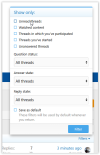
Have you found the filters? After marking everything as read (sorry no option but to lose easy access to already unread messages), try "What's new" but make sure the filter is set to Show only "Unread threads" . . .

1782719347553.png

At the end of each session, click "Mark all threads read" and the next time you visit the site, and repeat the Filters/Show Only/Unread threads process (if it doesn't remember to retain that filter - presumably the Save as Default tick box might do this), you will only see threads that have new messages in them. What I can't tell you is whether clicking on the thread title will take you directly to the oldest new message. In the dim and distant past (so long ago I don't recall how I achieved it) I saved a Favourite which, when I click on it now, it takes me to a list of threads that contain new messages and takes me straight to the oldest unread message in that thread. As long as I mark all threads read at the end of each visit, using that Favourite the next time takes me to exactly what I want to see (and sounds like what you would like to see).

I hope something here helps.

Cheers

David
 
Have you found the filters? After marking everything as read (sorry no option but to lose easy access to already unread messages), try "What's new" but make sure the filter is set to Show only "Unread threads" . . .

View attachment 358128

At the end of each session, click "Mark all threads read" and the next time you visit the site, and repeat the Filters/Show Only/Unread threads process (if it doesn't remember to retain that filter - presumably the Save as Default tick box might do this), you will only see threads that have new messages in them. What I can't tell you is whether clicking on the thread title will take you directly to the oldest new message. In the dim and distant past (so long ago I don't recall how I achieved it) I saved a Favourite which, when I click on it now, it takes me to a list of threads that contain new messages and takes me straight to the oldest unread message in that thread. As long as I mark all threads read at the end of each visit, using that Favourite the next time takes me to exactly what I want to see (and sounds like what you would like to see).

I hope something here helps.

Cheers

David
Have to say I have found this in the past ‘hangs head in shame’ but cant find it now!
 
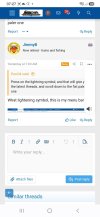
Press on the lightning symbol, and that will give you the latest threads, and scroll down to the fist paler one
 
Press on the lightning symbol, and that will give you the latest threads, and scroll down to the fist paler one
What lightening symbol, this is my menu bar:

Screenshot 2026-06-30 at 06.59.58.png
 
Ummm...

In a similar manner to @JimmyB, I don't have a lightning symbol either (running Chrome/Google) on a laptop.

1782890853612.png
 
Last edited:
Hmm, I have the lightning symbol.

I'm using an Android phone....
 
Press on the lightning symbol, and that will give you the latest threads, and scroll down to the fist paler one
No I do not find it either, what Menu option is the one you have shown? Is it somewhere in preferences?
 
Have you found the filters? After marking everything as read (sorry no option but to lose easy access to already unread messages), try "What's new" but make sure the filter is set to Show only "Unread threads" . . .

View attachment 358128

At the end of each session, click "Mark all threads read" and the next time you visit the site, and repeat the Filters/Show Only/Unread threads process (if it doesn't remember to retain that filter - presumably the Save as Default tick box might do this), you will only see threads that have new messages in them. What I can't tell you is whether clicking on the thread title will take you directly to the oldest new message. In the dim and distant past (so long ago I don't recall how I achieved it) I saved a Favourite which, when I click on it now, it takes me to a list of threads that contain new messages and takes me straight to the oldest unread message in that thread. As long as I mark all threads read at the end of each visit, using that Favourite the next time takes me to exactly what I want to see (and sounds like what you would like to see).

I hope something here helps.

Cheers

David
 
Thanks for your explanations but I did not found these filters. How do i get there (show unread threads) ?
 
Back
Top Bottom