Struggling with loco remote...

Hal Farsed

Staffordshire Moorlands Utility Tramway.
Country flag
Hello, it's me again. I have two locos fitted with loco remote. I only bought two as I found I prefer twiddling with a proper controller ( I was going to put knob, but thought better of it) than squinting at a screen in the light. They work ok until I try to drag a train with them; the second the loco takes a load they cut out and the screen freezes. Before I spend a wedge of cash replacing them with deltangesque equipment, has anyone had this? Is there a fix?
 
I avoided these kits as it just didnt seam upto the amps required and anything LGB/Piko related and was ideal for the little 16mm kits you get. I have 4 systems on the go at the moment and a new one arrived the other day to play with.
 
Hello, it's me again. I have two locos fitted with loco remote. I only bought two as I found I prefer twiddling with a proper controller ( I was going to put knob, but thought better of it) than squinting at a screen in the light. They work ok until I try to drag a train with them; the second the loco takes a load they cut out and the screen freezes. Before I spend a wedge of cash replacing them with deltangesque equipment, has anyone had this? Is there a fix?
Hm opening shot on their website suggests you can control several locs on the same phone but adds the ‘one at a time’ override. May be worth mailing them with your issues.
 
Hm opening shot on their website suggests you can control several locs on the same phone but adds the ‘one at a time’ override. May be worth mailing them with your issues.
Indeed. I just thought someone hereabouts may have a workaround or something.:)
 
I have three locos fitted with these, all on the same tablet, you need to get one running, change WiFi settings and to get another running, but you have then lost control of the first loco. As for the screen freezing, I assume this is the phone you are controlling them with where the screen freezes, not sure how that feedback could happen!!!
 
I have three locos fitted with these, all on the same tablet, you need to get one running, change WiFi settings and to get another running, but you have then lost control of the first loco. As for the screen freezing, I assume this is the phone you are controlling them with where the screen freezes, not sure how that feedback could happen!!!
Yep. Phone screen. I think they are made for people a bit more dextrous than me with a phone. Possibly with the ability to work one in the sunlight too. Coz I can see SFA on the (phone) screen outside. I might try this tablet and turn the brightness up to nuclear, see if that works.
 
Yep. Phone screen. I think they are made for people a bit more dextrous than me with a phone. Possibly with the ability to work one in the sunlight too. Coz I can see SFA on the (phone) screen outside. I might try this tablet and turn the brightness up to nuclear, see if that works.
I use my Loco Remote indoors mainly, as you are correct about the sun. I have an old (very) tablet which belonged to Mrs B for mine, and there is nothing else on the tablet.
 
I have three locos fitted with these, all on the same tablet, you need to get one running, change WiFi settings and to get another running, but you have then lost control of the first loco. As for the screen freezing, I assume this is the phone you are controlling them with where the screen freezes, not sure how that feedback could happen!!!
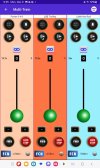
I hadn't realised that changing from one loco to another was so convoluted. I assumed each loco would have its own button on the screen so you could switch quickly from one to another, as with Blue Rail.

Multi-Train-611x1024.jpg

Rik
 
Yes Rik, it's a bit of a faff. And as mentioned above AFAIK there is no "all stop" control. In other news, I found the problem, my dodgy wiring and a duff cell. As there is no room on board the loco for a switch and charging socket, I simply unplug the battery pack (9 Volt type connector) to turn it off and to charge it. The pack is also made of individual cells in a spring type holder so plenty of failure points. Imma thinkin' wot to do...
 
I hadn't realised that changing from one loco to another was so convoluted. I assumed each loco would have its own button on the screen so you could switch quickly from one to another, as with Blue Rail.

View attachment 362728

Rik
I think the realistic cost of Loco Remote and the tech could be the issue here.
 
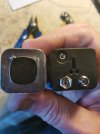
You can gain a little space with a made-up battery pack:
17936307481768293137539608591798.jpg
The 'PP3' snap connectors, are not really designed for regular connect/disconnect.

I don't believe you can't find space for a switch and (say) a JST-RCY lead for charging?

PhilP.
 
Back
Top Bottom