Track planning using 3D Train Studio

I am using 3D Train Studio and find it awesome.

You can download the software from

Free version seems very capable. Here is a sample layout I created with it - can't seem to upload animated GIF due to size! So posting an image instead. The train can be animated along the track.
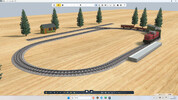
View attachment 352084
Pal of mine got into a similar type of package and was building a complex layout with scenery that he could run trains with individual wagons to separate stations, I think Timetabling was the thing as well. But beware it almost turned into another hobby with his garden railway being almost left out of his interest.
 
I found 3D Train Studio over Christmas and am using it for the same thing. I've never had a layout before so it's been really useful to take a 2d sketch with multiple heights and visualise it. It also showed a number of places where my 2d sketch was rather hopeful on space as my lines weren't thick enough.

The limitation with the free version is the number of elements is limited to 150 and the layout I'm planning will easily exceed that in track pieces, I was lucky as it was in the Christmas sale so I only paid £20 for the full version. My advise with the free version would be to lay the track with the set pieces and then once your happy combine as many track pieces as possible so you have more element spaces for scenery. For example if you have 4 set curves together forming a curve you can replace them one piece of flex track and that will let you place 3 more trees if your at the limit. I must admit understanding how flex track in 3D Train Studio is handled was really hard to understand but once you've mastered it you can do some great things and it's unlimited length, if only it was like that in real life!
 
Back
Top Bottom