Using the Massoth 8156101 to Control Lights

John Russo

Registered
Country flag
I was unable to make sense of how to wire the 8156101 to control lights individually.

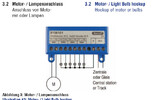
This diagram shows the recommended wiring for controlling 6 lights.

With a light bulb that has two wires, how would you connect each wire to this?

I understand the DCC connections. Just connect that to the track. It's the bulbs themselves I cannot figure out.

Also, what is the "+" connection?


1766080966075.png


The manual is here: https://www.allaboutlgb.com/pdfs/Massoth DiMAX 4-Channel Switch decoder II User's Manual.pdf
 
There is a common + terminal for all the LEDs and then F3-F8 are the negative terminals for each of the LEDs. Most decoders are set up this way as well with a common + terminal and then negative for the individual outputs/functions. Make sure you figure out the voltages and use the proper resistors for each LED. The LEDs are polarized whereas incandescent are not.
 
One further question.

I wish to control 8 separate bulbs.

It seems the addressing pairs F1 and F2 to a single address. Same for F3 and F4, etc.

Using DCC how would you control (address) F1 and F2 separately?

I have a Dimax 1210 and use Stellwerks software to send DCC signals to devices. It looks for a unique address for each device. CVs 31, 33, 35, and 37 set the same address for each pair of F1 & F2, F3 & F4, etc.

I was expecting that I could set 8 address, one for each F port. I don't think I can do that but then I do not see how I can control them separately using DCC.
 
Last edited:
After doing some reading, it seems I should treat the 8156101 decoder as a loco and use loco function keys to control the individual F1, F2...F8?

Looks like I should set Bit 7 in CV29 to 0 and then assign a Loco address in CV1.

Does this make sense?

(thank God for the Massoth Programming Tool!)
 
Yes, as far as I'm aware - function keys only work for 'loco' addresses and not switches so you'll need to be using a loco address.

Looking at the manual, yes Bit 7 = 0 sets it to loco. Then CV1 can be a value between 1 and 127. Obviously point but good to be explicit, ensure this is a different value to your locos otherwise your loco and this accessory decoder will respond.

The other thing to be aware of is I can't see an obvious way to set the voltage of those outputs so you should assume it's the same as your track power (probably 18->24v). If your bulbs are rated less than this, you may have an issue unless you reduce that voltage.
 
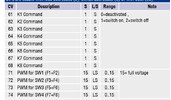
The voltage can be changed by setting CVs 71, 72, 73, & 74 PWM values.

Setting of between 0 and 15, 15 being 100% of the track voltage.

With PWM, it should yield a pseudo DC current.

1766164248237.png
 
Yes you need to use loco address CV1 or CV17/18 to control individual functions by setting CV29=2 (28 speed steps to match your CS) or CV29=34 for long address.

You will also need to set CV49=192 to change from couple switch to single function.

One thing to note is that a motor must be connected to SW1 for programming.
 
Back
Top Bottom