My 3d print projects ThreeD

a98087

Registered
Country flag
Hi

I’ve bought a Bambu lab P2S printer in there current sale and joist want to document and share my 3d g scale journey,

I chose this model printer as it’s an enclosed model for several reasons

Apparently more reliable prints due to stable temperatures
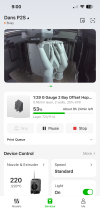
Remote camera viewable of the internet
Apparently a good beginner choice
Able to print a range of materials due to the enclosed box with a filter
Enclosed heated box more suited to a garage/workshop location


So far I’ve printed
the compulsory benchy boat model
Kids figets toys

And finally starting on my g scale items.

There’s a range of free files available
I’ve started with a 2 bay American hopper


Price wise the printer was £380
Filament is approx £10 a kilo
One wagon of this designwill use about 1kg of filament

This wagon is similar to the aristocraft 2 bay hopper.
The rtr wagons sell for £35-£80 if that helps anyone with the numbers

Dan
 

Attachments
  • IMG_4144.png
    IMG_4144.png
    629.5 KB · Views: 20
  • IMG_4143.png
    IMG_4143.png
    1.7 MB · Views: 20
Last edited by a moderator:
Hi,
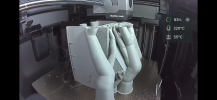
Looking at your pictures i wonder what the rounded tree shapes are for? Your printer isn’t a filament printer is it? Normally tree shapes like these are printed to provide support for overhanging parts when printing filament.
If your ptinter is s filament printer than you should never print small vertical walls or piles since the strenght of the binding between the printed filaments is much lower than the tensile strength of the filament. This means that you must print long objects or walls sllways flat on the glassplate. To enable that you must cut your model into separate pieces that you can print flat and later glue them together.

I hope this will improve your print results!
 
Heavens, it looks like some outer space alien parasitic lifeform or something that David Attenborough has dredged up from the Mariana Trench. What's going on there ? As you might have realised I have zero knowledge of 3D printing devices :D I just buy their produce.IMG_4143.png
 
Heavens, it looks like some outer space alien parasitic lifeform or something that David Attenborough has dredged up from the Mariana Trench. What's going on there ? As you might have realised I have zero knowledge of 3D printing devices :D I just buy their produce.View attachment 362800
Understand what your saying it does look the xray I saw this morning of my dog intestine !

its "support" 3d plastic as it comes out of the hot nossle is very unstable and wants to "droop". This support is required when trying to print a bit of the part that has a void under it to stop that droop. This is added between the designing and printing and should just snap off after printing. The lastest verions of 3d printers with multi nozzels will often print this in different colour and even different substrates. !

Im currently using a Trade 3d printer to create a part and its using a powder to do the same job ( MJF) , A resin printer used the liquid its sitting in to help this. 3d printing really is moving on quickly but the machines other and for hobby use are eye watering £££££. Im going to do a review on here of the MJF part im having printed for me (its currently just finnished printing according to the online tracker, and now waiting vapor smoothing ! )
 
Last edited:
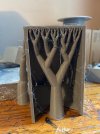
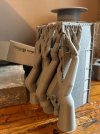
Here’s a better photo showing the supports,

They break of easily,

There’s probably a better way of doing it, but this was a preloaded profile sent from my phone straight to the printer via the app

Dan
If your getting the files online sometimes there is and option to have them without support, you can then import that into you slicer/printer software and let the printer add them instead and they might be more economical to print and less time. I mentioned in a post the other day that I undertook a print that took 65 hours ! (2.7 days) on my Snapmaker, it was crazy in reality but fun to check, is that an inbuilt camera on your printer ?
 
Here’s a better photo showing the supports,

They break of easily,

There’s probably a better way of doing it, but this was a preloaded profile sent from my phone straight to the printer via the app

DanView attachment 362804View attachment 362805
There are some out there in the 3d world that are somehow managing to recycle the waste.
 
Experiment with changing orientation so that there are a minimum of overhangs reduces supports, saves plastic and reduces print times.
Your slicer should have a view show to a view of supports before printing. Consider joining Bambulab forum to get some help
 
Back
Top Bottom