
stevedenver
Registered

1 i am a digital numpty. I am improving at a snails pace, but still really know nothing.
2 as such, i bought a central station 3, which allows me to put an mfx loco on the track and cs3 finds it. I can ‘run and play’.
3 i recently bought massoth passenger car lights, digital version.
4 i successfully hooked everything up. It lights, no issues.
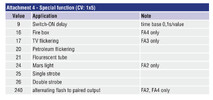
5 in reading the light pamphlet, there is a ‘petroleum’ light mode. I am intrigued. My coaches are US circa 1880. I am assuming that it has a different light mode, like a lantern flicker. (It mentions, i believe , from memory, fa ?or pa? Settings. Have no idea how/where to find these.
6 i put the coach on the track, powered up cs3, hoping it might find the light board. I poked around the icons, i couldn’t find anything.
7 how might i access/change the light mode?
Id be grateful for answers that run me through step by step. Please assume i am 5 years old.(even that might be giving me more credit than is merited).
Fwiw, i cant even change a loco address..i dont know how. Nor have i ever accessed cvs.
As is said, first do no harm.
Thanks
2 as such, i bought a central station 3, which allows me to put an mfx loco on the track and cs3 finds it. I can ‘run and play’.
3 i recently bought massoth passenger car lights, digital version.
4 i successfully hooked everything up. It lights, no issues.
5 in reading the light pamphlet, there is a ‘petroleum’ light mode. I am intrigued. My coaches are US circa 1880. I am assuming that it has a different light mode, like a lantern flicker. (It mentions, i believe , from memory, fa ?or pa? Settings. Have no idea how/where to find these.
6 i put the coach on the track, powered up cs3, hoping it might find the light board. I poked around the icons, i couldn’t find anything.
7 how might i access/change the light mode?
Id be grateful for answers that run me through step by step. Please assume i am 5 years old.(even that might be giving me more credit than is merited).
Fwiw, i cant even change a loco address..i dont know how. Nor have i ever accessed cvs.
As is said, first do no harm.
Thanks