Advice needed setting CV value to work with pulsed smoker Massoth 8415001

originalgrounds

Registered
Hello All.
I’ve about come to my wits end figuring out how to sync my pulsed Massoth smoker for round boilers PN 8415001 with my Massoth Emotion XLS decoder V2.5 on a LGB Forney 21252. I decided to skip the hall motor sensor because I see no evidence that it is working. When hall sensor was plugged into smoker, nothing happens other than functions provided through dcc track. When connected to Emotion XLS I can receive a pulse signal when setting Emotion CV 114 timing interval values 1-15. When I select value 30 for synchronized smoke it has the same affect when connected to the hall sensor. Just a small idle stream of smoke. Being able to adjust timing through CV 114 proves wiring is correct. I’m happy with the chug sound through sound steps so don’t miss the hall sensor. Any ideas what CVs need to be adjusted to provide synced smoke using sound steps?

CV 114 is currently set to 1 so I at least have something interesting to look at while figuring out why CV 114 value 30 doesn’t do anything. Thanks for any advice I can get.
 
The hall sensor needs to be plugged into the smoke unit clock input and the smoke unit then has its corresponding 3 wires clock output plugged into the decoder to produce the smoke and chuff derived from the hall sensor. Hall sensor --> smoke unit --> clock input on decoder. CV196=0 for steam external pulse generation

If you plug the hall sensor directly to the decoder clock input you should see the chuff synced with the wheels. You just insert the smoke unit into the middle of this chain to produced synced smoke and sound.
 
Thanks for taking the time to respond. When I first installed the unit I did as you mentioned but there was no pulsing. Hall sensor to smoke unit then output to clock on board. Adjusted smoker settings but nothing was happening when throttle engaged. This led me to believe my hall sensor isn’t working correctly. I now have smoker plugged in to GND and A3 on my decoder. I can get pulsed smoke when I set CV 114 to values between 1 - 15 values (intervals of 1 - 15 seconds) but nothing when I set to value 30 for synced smoke generation. The interesting thing is I can change the value of CV 195 which determines if a hall sensor is installed or not which makes my chugging go out of control even when I change the value back which generates pulsed smoke at a high rate. I can then adjust timing of chug but it reverts back to slower speed with no syncing even though values are saved. It makes me think I am dealing with a bug on my board. Not sure why the chugging goes out of control when setting CV 195 even when I write back the previous value. If I can adjust 195 so chug goes out of control then adjust timing and have my board save that setting I might be good. This was discovered this morning when tinkering more with the CV settings.
 
You can find out if the hall sensor is working by plugging it directly into the clock in on the decoder and seeing if they chuff is then synced to the wheel revolutions. Start there by getting that to work before messing with the simulated pulse CVs. CV195 adjusts the chuff rate for the external clock. CV196 is for turning external clock or simulated on/off.
 
Last edited:
My chuffs go haywire when selecting cv 195 with values 1-4 with hall sensor plugged in. I have to set chug pausing on CV 196 very high to settle it down. Even when I set 195 to 0 which is no external sensor it remains haywire. Then settles down after a few power cycles. It’s very strange so I might have a faulty hall sensor or decoder. Thanks for your replies. It helps confirm I’m not missing anything.
 
If you set CV196=0 then 195 controls the chuff frequency per wheel revolution.

Perhaps do a reset on the decoder to factory defaults.
 
Last edited:
I agree. A factory reset may fix the chug from going crazy but initiate synced smoke only to have it chug too slow after a power cycle with no synced smoke. Reading all my CV values now to JMRI so I can save then try a complete factory reset instead of partial reset. I want to make sure the smoker works to my expectations before I do the complete install which will entail cutting up the lead weight. It’s too bad there is no such thing as a pulsed smoke generator that fits vertical in the smoke stack. This model has a big smoke stack I wish I could take advantage of. Now to find out how to do a complete reset. I’ll post results soon
 
You are right. No chuff sounds when 195=1 - 4 and 196=0. All other sounds work. I confirm the hall sensor is plugged in clock 1 on the board. Both the smoker and decoder are not picking up the hall sensor when loco in motion. This explains why there is pulsed smoke only when sometimes changing these settings can causes the chug sound to go crazy. This confirms my hall sensor is malfunctioning and I must rely on sound steps.
 
Great, thanks for confirming. You could try replacing the hall sensor, or use the following settings for simulated pulse:

Massoth Smoke unit settings
CV29=0/32 (long or short loco address to match the XLS decoder address)
CV17/18 - long address for smoke unit (to match loco)
CV1 - short address for smoke (to match loco)
CV50=2 (steam pulse)
CV120=7 (F key for smoke on decoder)

Make sure you lock the smoke unit CV15/16 once settings are achieved so programming loco decoder wont adjust the smoke unit

XLS settings
CV196=255 (clock sim)
CV197=1-20 (your choice on chuff rate)
CV113=7 (F key for smoke unit)
CV114=30 (A3 output for pulse)


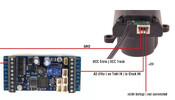
Use the supplied 3pin cable with the smoke unit and plug it into the smoker clock input, then cut the other connector off and connect the middle wire to A3 on the XLS and the outside left to DEC- as per the diagram:

1767111415272.png
 
Last edited:
Great, thanks for confirming. You could try replacing the hall sensor, or use the following settings for simulated pulse:

Massoth Smoke unit settings
CV29=0/32 (long or short loco address to match the XLS decoder address)
CV17/18 - long address for smoke unit (to match loco)
CV1 - short address for smoke (to match loco)
CV50=2 (steam pulse)
CV120=7 (F key for smoke on decoder)

Make sure you lock the smoke unit CV15/16 once settings are achieved so programming loco decoder wont adjust the smoke unit

XLS settings
CV196=255 (clock sim)
CV197=1-20 (your choice on chuff rate)
CV113=7 (F key for smoke unit)
CV114=30 (A3 output for pulse)


Use the supplied 3pin cable with the smoke unit and plug it into the smoker clock input, then cut the other connector off and connect the middle wire to A3 on the XLS and the outside left to DEC- as per the diagram:

View attachment 351544
Thanks, Diesel. I really appreciate your time assisting me. I confirm my settings match yours. I was unable to find how to complete a full factory reset unless a complete reset is simply to reset all 4 - 5 sections of CV values independently. Both manual and JMRI indicate resetting sections not a complete reset in one step. No luck with settings described so maybe the reset will work. I’m thinking the best thing to do next is simply accept timed pulsing instead of synced or spend time breaking down my locomotive to repair or replace my hall sensor. I’m also wondering if the manual is referring to a different xls firmware version. I’m not 100% sure my firmware because I get a no loco detected when reading CV 7 for version. Values and CVs are slightly different depending on the version.

Separate subject… I have a very large smoke stack that I wish I could utilize instead of cutting my lead weight in half. I’m brainstorming ways to possibly modify my smoke to fit inside the smoke stack instead of cutting out half my lead weight. I’m pulling 5 cars and I’m sure I’ll have to reduce the cars if I take out that much weight. Might breakdown the stacker to see if a modification can be made to fit in the stack.
 
Yes a complete reset for Massoth is all the CV8 sections independently.

I have not used JMRI for programming those decoders, only the Massoth PC module or the Massoth CS.
Thanks for confirming. I may consider the programmer if I obtain 1 - 2 more Massoth decoders. Changing the sound files and updating firmware appeals to me.
 
Back
Top Bottom