3D Printer Recommendations Please

kedwards

Caving, Garden Railways & more caving. Fan of TTTE
Apologies if this has been covered before. If so then please point me to the thread.
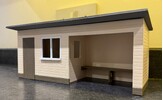
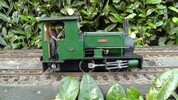
I've been making station buildings out of foamboard.
IMG_5984.JPG
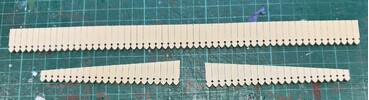
The dagger boards were too difficult to make so son in law designed and 3D printed them for me.
IMG_5985.JPG
I'm so impressed that I have decided to buy a 3D printer to print out small items for my railway, but the printer market is a minefield for a numpty like me.
Do I go single or multi-colour? What size bed do I need? How much do I need to spend? Do I need an enclosure for printing with certain materials? I could go on.
What would your advice and recommendations be?
Thanks,
Keith
 
Apologies if this has been covered before. If so then please point me to the thread.
I've been making station buildings out of foamboard.
View attachment 352438
The dagger boards were too difficult to make so son in law designed and 3D printed them for me.
View attachment 352439
I'm so impressed that I have decided to buy a 3D printer to print out small items for my railway, but the printer market is a minefield for a numpty like me.
Do I go single or multi-colour? What size bed do I need? How much do I need to spend? Do I need an enclosure for printing with certain materials? I could go on.
What would your advice and recommendations be?
Thanks,
Keith
Hm tricky question. ge_rik ge_rik has written extensively about it and done lots on his blog. Also have a look at Sam’s Trains on You Tube, he has a good selection with many examples of how he goes about it. Some of the suff he has made a bit futile but the quality of the items very good. I am thinking here about his ‘smallest 4 wheel coach’ build.

He also has a Resin Printer that he has done vids and the quality here appears to me to be second to none. I have not yet dabbled and wont need to as my local ‘Man Cave’ has 2 x 3D printers plus a Lazer Wood Cutter so happy days for me once I get to grip with the 3d design CAD package required.
 
once I get to grip with the 3d design CAD package required.
Keith, think long and hard about this tiny quote before you spend any money on hardware..

Do you have the time to invest in learning how to use a CAD package, as well as how to use the machine? - Though there are now machines that will work straight out of the box.

I may be thought of as a bit of a luddite, but the longevity of 3D printed items is questionable, at least. - They are not stable as temperatures change.

PhilP.
 
Keith, think long and hard about this tiny quote before you spend any money on hardware..

Do you have the time to invest in learning how to use a CAD package, as well as how to use the machine? - Though there are now machines that will work straight out of the box.

I may be thought of as a bit of a luddite, but the longevity of 3D printed items is questionable, at least. - They are not stable as temperatures change.

PhilP.
Possibly true, but I am sure the Rik having produced quite a lot now would be able to reflect on the longevity. My gut feeling is that Resin printed may be a better bet outside, I have had cast resin items outside for some time now with no issues.
 
A lot depends on how much you can afford to spend. For a long time Creality Ender printers have been the main go-to for those starting up, but lately Bambu printers have been getting good reviews.

Creality UK presently have a sale on - Creality Flash Sale Up to 66% Off – Limited-Time Deals on 3D Printing

As do Bambu UK - 3D Printers | Bambu Lab UK Store


Personally, I would opt for a simple straightforward printer for starters such as the Ender 3. There is plenty of support online for it if ever you get stuck. I bought one secondhand from a mate and have been very pleased with it.

You could take a look at some of the review sites to find out what they consider to be the best starter printers


If you're wanting to play around with 3D CAD, I would start with Tinkercad. I've been using it for about four years and although it's not as sophisticated as other programs, it's easy to learn and so far it's done all I've wanted it to do. I've blogged my most recent loco build showing how I drew the various parts for it - aiming to share some ideas for those wanting to have a go themselves.


Rik
 
Hello Keith,

Do I go single or multi-colour?
Multi-colour ist often just a case of convenience as you can simply select the colour you want and it will automatically pull it from the magazine. Not really necessary but convenient.

What size bed do I need?
Depends on the usual size of the parts you need. But the 256x256mm is pretty much a standard size.

Do I need an enclosure for printing with certain materials?
Yes, ABS, ASA or PC will need an enclosure, but printing always emits VOC's so it is recommended.

What would your advice and recommendations be?
A friend of mine just got the BambuLab P2S. IMO the perfect package with good support and software. Works out of the box, has a nozzle quick change system and you always have the ability to add the AMS for multi material later on.

Greetings,
Ben
 
Thanks everyone and especially Rik and Ben.
Phil, I think I am prepared to go through the pain of learning to use CAD software. I have people in the family who will be able to help too.
My questions have been answered and the P2S has been recommended by several people, but it is more than I was willing to spend.
I'm not quite ready to take the plunge yet, so meanwhile I will go back to watching YouTube videos. :think:
 
Phil, I think I am prepared to go through the pain of learning to use CAD software.
If you just want to play around and make a gentle entry to the CAD world I would recommend FreeCad. As the name says, totally free and open source, a lot of tutorial videos on the web and loads of open documentation.

My questions have been answered and the P2S has been recommended by several people, but it is more than I was willing to spend.
Of course, it's not something you take with you when you go grocery shopping - but take it from someone who went the cheap way first... you will avoid a lot of headaches.

If you have any further questions, feel free to ask :)
 
Thanks everyone and especially Rik and Ben.
Phil, I think I am prepared to go through the pain of learning to use CAD software. I have people in the family who will be able to help too.
My questions have been answered and the P2S has been recommended by several people, but it is more than I was willing to spend.
I'm not quite ready to take the plunge yet, so meanwhile I will go back to watching YouTube videos. :think:
If you have a local Man Cave it may be worth asking if they have 3d printing facility like mine does, be a good way to get started if they do.
 
I'm a little late to the party but here's my advise. I designed and build my first 3D printer 13 years ago, at times it would print far better than anything on the market back then but it was massively unreliable and quality was very variable. I was constantly re designing parts and making it better over the years. 3D printing was the hobby it wasn't a tool. I always said to people back then when they came to me with this new super cheap printer, do you want a hobby or a tool, they all wanted a tool but didn't want to pay the price and instead bought printers that were quickly designed with cheap parts and many design flaws. I always said to them buy a Prusa if you want a tool. Finally I think 7 years ago I took my own advise and purchased a Prusa Mk3S and within 2 months the printer I designed was taken apart and never used again. The Mk3S has over 1000 hours of print time and one part failure the wire to the bed temperature sensor because for a while the build plate axis was causing the wire to touch the wall which slowly broke the wire cores. This was replaced with a cheap equivalent sensor off ebay.

Roll forward a few years and the Mk4 came out and I bought one as it looked so much better. The real improvement was proper bed leveling and speed, I print with 0.6, 0.4 and 0.25 nozzles and changing them on the MK3S took 30 minutes and often the many print failures after until I got the sweet spot with the z height. With the Mk4 it's a few minutes and it's done. To be fair it is a lot quicker for the same print quality, around 60% of the time, off the top of my head. I also updated that to the improved Mk4S at little cost and it made quite the difference in print quality. That's the great thing with Prusa you can upgrade your printer with official upgrade packs.

Roll forward a few more years and the CoreOne came out and I couldn't resist and this is the printer that mainly gets used today because it is so well designed but it prints exactly the same as the Mk4 and the same speed which is a little disapointing. It's enclosed so I can print more exotic filaments but I haven't done much of that yet. I do need to upgrade it to the plus version but for me the benefits are so minimal, this upgrade you can print most off the parts and buy a few screws. There is a very interesting multi tool version coming out soon which I may go for, mainly to try out multi colour printing and the possibility of prints using 3 different nozzle sizes, 0.25 for the outside and 0.6 for the inside or adding more strength with large layer lines. For me 3D printing is still a hobby as well as having tools that I can press a few buttons and leave the printer for 16 hours and not even contemplate coming back to a failed print, I've had so many balls of spaghetti I still check on the CoreOne but it hasn't let me down yet. It always used to be really important to keep the nozzle clean and make sure the first layer went down well. Honestly now I just turn it on and control it from my computer and don't get rid of the ouze that comes out the nozzle while it's warming up or check the first layer. It just works everytime which still amazes me.

The main things I've learnt over the years is you don't need a big build volume, my first printer was 300mm square and the full size got used once for a 25 hour print vase. I do tend to use the full size of my CoreOne these days but with some clever design, dowels and glue a small build plate isn't an issue. I've always be interested in multi colour printing but it is expensive due to filament waste (this is getting better) and the sheer quantity of different colour filaments you'll end up buying. I know honestly I'd be happy printing with my old Mk3S+ still, it's slower but it sits not doing anything for most of it's life so the time doesn't really matter.

I know I'm a massive Prusa fan boy and many people end up loving the brand they use, 3D printers are very Ford or Cheve. I came close to buying a Bambo printer before the Mk4 was released, the thing that held me back was spare parts, the Chinese control everything approach and back then they were very new to the scene. They have lasted and created a lot of great printers and forced the price of all printers down. Parts are very bespoke and they try to force you to buy everything from them even filament. There was a massive issue a year ago with a firmware update they did that was a real security issue for many, I don't remember the detail. But so many people swear by them so they must be good.
As for Creality and all the other clones, I know 10+ people who have bought them hoping for a tool and ended up with a forgotten hobby that collects dust. When I talk to them about it there is always this new mod that will make it great, a lot of them have the band new mods sitting in a box on the printer still not fitted, my boss has a huge Lulzbot with £400 worth of upgrades boxed next to it, they have been sitting there for the 4 years I've worked for him. When we need parts I bring in one on my printers! They are all engineers who enjoy a challenge but getting the printer to work as they expected it to out the box feels too much like the day job so they sit collecting dust.

With Prusa they are still trying to hold onto the open source better future concept so everything is open even the slicer which is the core of most printers these days, even Bambo slicer uses the Prusa software at it's core. I dropped a printer on another a year or so ago during our house move and broke a part, an hour later after downloading the part from the Prusa website and printing it on another printer it was printing again. The printers they make will always be fixable as they were designed that way. The new prices are high due to the smaller numbers build and the open source mantra, biuying on you end up paying indirectly for every other printer manufacturer getting a cheap slicer they just need to re badge.

Knowing what I know now if I was to start out again, I'd by a second hand Prusa as mine have proved the reliability and resilience over the years. If I wanted to print with one nozzle I'd buy a Prusa Mini basically a Mk3S+ but smaller and much cheaper with a really interesting design to reduce parts, a quick look on ebay and they are going for £180. If I wanted to change nozzles I'd buy a Mk4 and get the Prusa upgrade to S or buy a MK4S. Now checking prices scrub that, I'd buy 2x Mini's as the second hand price of Mk4s is so high. I'd put a 0.25 nozzle on one for printing people and objects where detail really matters, with a 0.05mm layer height the layer lines are so small even paint runs like a plastic model kit. On the other I'd put a 0.6mm nozzle and use it to print anything larger that doesn't need the detail. It would take time to get both setup correctly but once this is done it would be plain sailing.

 
I own 2 of these and they suit me well for what I am doing, no messing around with levelling the bed (a big issue with my first was getting it level) it maps the print bed and saves the settings.
So far I have only done that once and it is still working, in fact it printing a set of points right now.

As for heat I am moving to a filament called PETG, it has some UV resistance and being in Australia I need every bit of sun protection I can get. I have some raw PLA filament that has been sitting outside for about 3-4 years and it is starting to breakdown now but it has been out there with no protection at all. I have other pieces tat have been painted with exterior house paint and are fine.

I have heard good reports about this entry level one

This is on my wish list

A good "slicer" is a necessity for 3D printing and Cura is the most popular around.
Like Rik I use tinkercad 1. because its free and 2 Its designed to teach children how to use CAD so that suits me fine.

I thought about multi filament feeders (using the AMS system??) but from what I can gather they are a bit wasteful on filament
 
Last edited:
Some very good advice above.

I would suggest a printer with a built in enclosure. This will allow you to print with ABS which is a tougher material than the standard PLA filament.
I think an enclosure makes the whole printer more rigid helping to maintain the print bed level.
Look out for a high nozzle temperature above 250 C (sometimes called a hot end).
Print volume is not a major issue because you can split the models in the design.
Lots of decent printers around the £300 area. Multi colour not important.
Automatic levelling would be a bonus as would easy nozzle change.

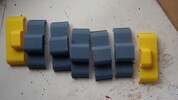
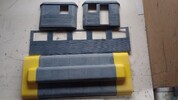
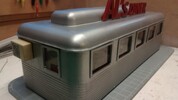
This is my latest build, a US diner and I had to build the roof from 7, and the sides from 5 sections using ABS which softens and bonds easily with the right solvent. It is also softer than PLA and PETG so it is easier to smooth the joins. -
IMG_20250916_130554391.jpgIMG_20250926_170655315.jpg
IMG_20251109_161627293.jpg

As for software, I have an engineering background and enjoyed technical drawing at school so the learning curve was not too hard. I use Freecad and it is a very powerful package. Good tutorials online by Mango Jelly Solutions.
With Freecad you can make, for example, a window style that is driven by a spreadsheet. You can then make different sizes of that window simply by changing the height and width dimensions on the spreadsheet. Window frames alone are a good enough reason to get a 3D printer.

You could download the software of your choice and just have some fun designing simple shapes and then progress to more complicated ideas. You don't need a printer because the 3D visualisations allow you to see the model as a real solid.
You can get used to the software design and then the only limit of what you can make is your imagination.
Plus you can make things not related to model railways, it is surprising what you can make or repair.

AL
 
Ive had the chance to use Machines from Creality, Prusa and Bambu Labs.

I would stay away from Creality as a newbie. Even their more advanced "work out of the box" printers have tons of issues.

Prusa are excellent with a fantastic community. Ive used their Mk4s which is an open bed printer so best used for PLA and PETG.

My Bambu Labs X1C is a workhorse and runs pretty much continuously. It has an enclosed chamber so can easily print in ASA. Its like ABS except that its much less prone to warping, and has excellent UV, heat and impact resistance. Great for functional parts that will be outdoors.
Its pricey but at the time it was the closest thing to somthing that works out of the box. Prusa have since released their own enclosed printer which I'm sure is just as good.

If you can do without printing in ASA and don't need an enclosed printer, they make a smaller version for around £200. It can be upgraded to print in multiple materials down the line too.
I would avoid using the multi material for colour - its slow and can be quite wasteful. Better to split the part into separate objects or design it with that in mind from the start.
Where its really useful is for using support interface material. The printer uses the same filament for most of the support structure, then switches to the interface filament between the supports and your part for a few layers. It not only makes removing support material much easier, it also leaves a superior surface finish.
Usually the areas where the support makes contact with your part can end up quite rough.

In terms of software, I use Fusion 360 now but it has quite a steep learning curve. Looking back now, it would have made my life a lot easier if I had been using it and gaining proficiency from the start. It has a built-in timeline which lets you go "back in time" to an earlier step. For example, your printed part ends up too short - go back to the point when you set the length of the part, adjust the dimension and watch the part update itself, including adjusting the changes you made after that. You can use parameters to quickly adjust many aspects of a designed part too, but thats a bit more advanced. You have to design the part with these parameters in mind and define them as you go along.

That being said, Sketchup is the most user friendly and intuitive software for 3D modelling and its what I started with.
I'm sure you can find software keys for their older 2016/2017 software for quite cheap now. You need a plugin to export to STL which the printers slicer software understands, but that is easy to get and install.
Sketchup has other plugins like curviloft and roundcourners which make modelling more complex parts a breeze. Want to add a chamfer to an edge? Select it, set your desired radius and hit go.

A great thing about 3D printing is you don't need to be a designer. Lots of people share their models for free online. Thingiverse, Cults3D, Makerworld, Printables, Creality Cloud are all great places to find models. If youre looking for parts like in the images at the top of this thread, I guarantee you will find things like that online. If they aren't exaclt what you need, its not too difficult to stretch or scale models to make them suit your purposes. Its free to sign up and create an account at which point you can start looking and collecting models. You can then make a decision on if its worth getting a printer to make the parts you have collected.

But for the love of god - don't be tempted by a cheap printer on facebook marketplace unless you've done your research, know everything about it and get to see it working before you hand over your hard earned cash. If its cheap, it's probably for a good reason. There's nothing more frustrating that spending time fixing a tool instead of getting to use it.
 
Thanks again to everyone for your advice, all very interesting and informative.
I'm not ready to take the plunge yet, but I think I will be buying an enclosed printer and won't bother with multi-colour printing.
 
Just one more voice from the wilderness:

I have both an Elegoo Saturn 4 16k resin printer and a Bambu P1S with AMS. Both machines are solid, although the Elegoo is a replacement machine because an upgraded file Elegoo support sent me drove the build plate rapidly into the resin tank and filled the electronics with resin. Glad I bought the extended warranty from Amazon - easy refund.

At any rate - resin printers will in general give you much finer resolution, and because they expose the entire build plate at once, it doesn’t matter how much you have on the plate - the print time is the same. I.e. print time is driven by how tall the print is and the number of slices you set. The quality is amazing, and there is a wide range of materials. However, you can’t do multi materials, it’s a messy process, curing is tricky, and the parts aren’t as robust as their filament counterparts in general. I have not played with their ABS-like resins yet, but the standard photopolymer resins are not very tough. They will crack rather easily IMHO.

My Bambu P1S has been awesome so far. I did my homework and this was the model I landed on. The AMS is nice to have, as you can print layers of different materials by just telling the machine what material is in each spool. I got the P1S with AMS for $599 off Amazon. So popular it took me a month to get it - but that was probably due to the holidays.

There is no real advantage to the upgraded AMS 2.0 from what I can tell, so wouldn’t waste money on that.

As others have said - lots of free G scale models out there to play with. I have used CAD on and off for years but very rusty at this point. I was proficient at SolidWorks at one point, but the pricing for an individual is ridiculous. Also used Rhino3D for some time before they got expensive. TinkerCAD has a solid following, as does SketchUp and Fusion 360. Plenty of reviews out there on one vs the other, so just do your homework.

Either way you go - I echo the “buy a new machine” approach. These machines are half the price of my Makerbot replicator from 2014, and waaaaay more capable. You won’t save money buying a used one. I find I buy a lot of kit off Amazon, and so here in the US you can pay $16.99 a month and get warranty coverage on virtually anything you buy as long as the warranty is in effect. I have saved a lot of hassle with appliances and others going this route. If you have an issue, just make a claim, print out the shipping label, send it in, and they will either repair it or refund your purchase price. Not sure if you have the same in the UK, but it gives me peace of mind on purchases such as this.

Best, Trent
 
As someone who made his entry to 3d printing with an SLA printer.. yes, if you are handy with those kind of things. However, SLA brings a lot of health risks with it that aren't properly researched yet. The resin itself is toxic, the fumes while printing are toxic and finally you need to clean the parts with alcohol before curing them (which is also a wasteful process). Dialing the resin in to your specific machine and environment (humidity+temperature) can be a big pain as they are quite sensitive.
Of course SLA has its advantages, mostly in the detail you can achieve. That is the reason my models get fully SLA printed now. But honestly, it often pays off to outsource the printing process, especially if we talk about models in G-Scale. Companies in the field know what they are doing and you can be certain that the parts you order will be perfect.
 
Bambulab A1 is often cited as best printer for beginners.

Most CAD apps have steep learning curve. Blender is free and good for creating all types of shapes. It needs some good time and experimenting with though.
 
Back
Top Bottom